Your project
Every dataset in XNAT lives in a project, and access is controlled per project. When you first log in you will have no projects listed.
Only UQ staff and students can request a new project, because each XNAT project is allocated against a UQ-RDM HPC collection. If you are not at UQ, ask a UQ collaborator to request it.
-
Create a UQ-RDM HPC Collection.
Open https://rdm.uq.edu.au/create-record, log in, and fill in the record with your project details.
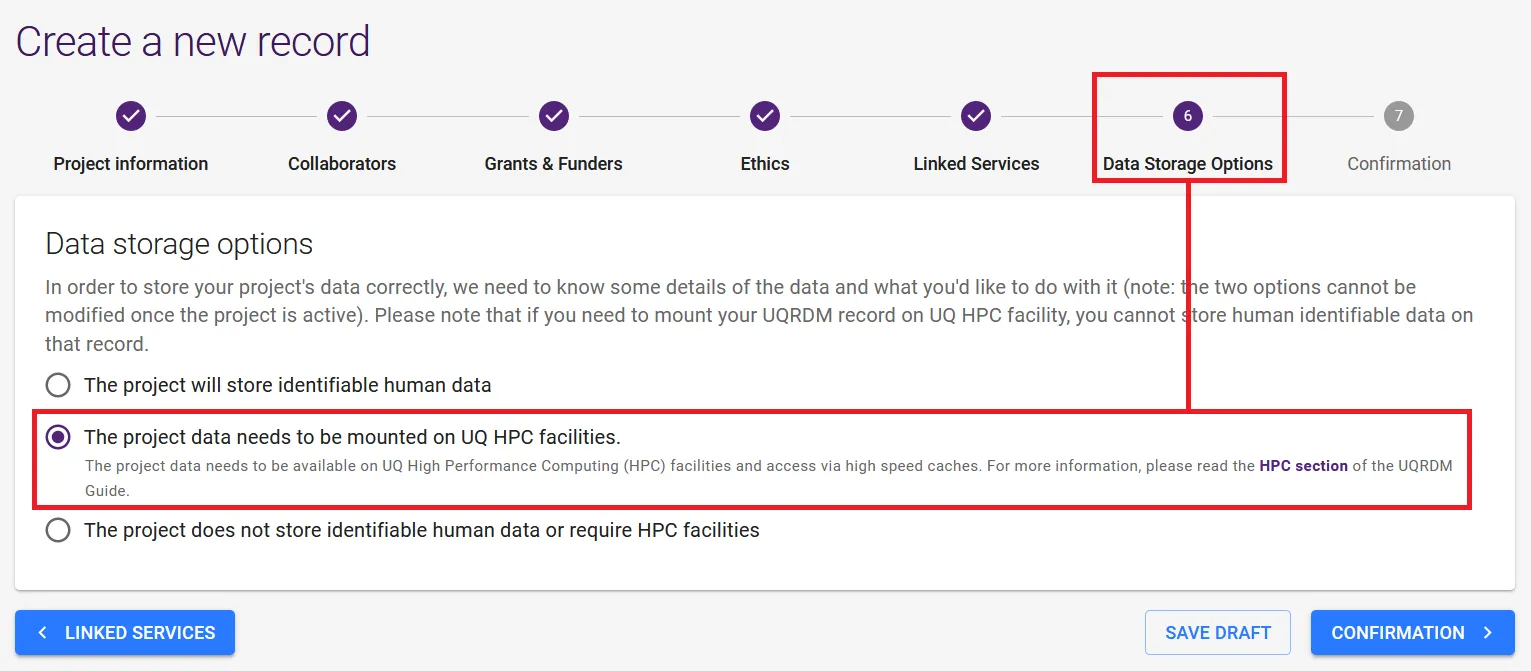
Select REQUEST DATA STORAGE. You will end up with a collection name such as PROJ001-Q0189 — HPC collections end in -Q, not -A or -I.
-
Send the request to RCC support.
To rcc-support@uq.edu.au Subject Body -
Wait for confirmation. Project setup typically takes around 24 hours.
Access is granted per project by an Owner, so someone has to add you.
-
Ask the person who owns the project to add you.
- A study run by a colleague — ask the study lead.
- Data acquired at HIRF, CAI or TRI — ask the facility, if they set the project up.
-
They follow Granting access and choose your role — Owner, Member or Collaborator.
-
Log in to XNAT. The project appears in your project list.